For solo contractors
Built native for iPhone & Android, not ported

Job logged.
Invoice sent.
Get paid.

Built for plumbers, electricians, HVAC techs, painters, roofers, and handymen. Log the job, snap before/after photos, send a professional invoice — all from your phone in under 90 seconds.

A simpler, faster alternative to Jobber and Housecall Pro — built for solo plumbers, electricians, HVAC techs, and handymen who want an offline-first invoicing app, not a dispatch platform.

90 sec
Job complete to invoice sent
$9.99
Per month — no document caps
100%
Offline-first — works without signal

Logged is a job logging and invoicing app for solo contractors — plumbers, electricians, HVAC techs, painters, roofers, and handymen. Log a job, snap GPS-stamped before/after photos, send an estimate the client accepts from a web link, and invoice in under 90 seconds.

Every screen works offline, including Send. It's free to download — Logged Pro is $9.99/month or $89.99/year for unlimited jobs, customers, Stripe card payments, and automatic cloud backup.

How it works

Job to invoice in under 90 seconds

1

Log the job

Select your customer, describe the work, snap before photos. The whole job takes under 30 seconds — and it works even when you have no signal.

2

Complete and invoice

Tap Complete Job. Your invoice is generated instantly with your photos already attached and your business details pre-filled. Nothing to retype.

3

Get paid

Free: share the PDF yourself by text or email. Every plan: your Venmo, Cash App, PayPal and Zelle details print on the invoice with the amount due. Pro: email it from the app with a payment page your client pays by card in seconds. Or mark it paid on the spot for cash and checks.

Native advantage

How Logged compares to Tofu, FieldVibe, Joist, and others

Most field service apps are built for multi-crew operations and priced accordingly. Logged is for the solo plumber, electrician, HVAC tech, or handyman who wants a fast, offline invoice app — not a $49/month dispatch platform. Here's how the common alternatives compare:

And on the engineering side: most job management apps at this price point are built once and ported to every platform — you feel it in every scroll, animation, and camera tap. Logged is written natively for each platform: Swift for iOS, Kotlin for Android. No shortcuts, no compromises. On iPhone Duo, unfold it and your jobs, invoices and customers sit beside whatever you have open.

Logged Tofu FieldVibe Joist
Native iOS + Android ✓ Swift & Kotlin ✗ Cross-platform ✗ Cross-platform ✗ Cross-platform
Offline-first ✓ Always ~ Partial ✗ ✗
Send invoices offline (auto-sends on reconnect) ✓ Queued & auto-sent ✗ ✗ ✗
Photos in PDF — free ✓ Free ✗ ✗ ✗
Unlimited invoices ✓ Pro (free: 10 jobs) ✓ ✓ ✗ 5/mo free
Estimates & quotes ✓ ✗ ✗ ✓
Card payments via Stripe ✓ Direct to your bank ~ Add-on ~ Add-on ~ Add-on
Auto reminder email to client if an invoice Logged emailed is unpaid ✓ (Pro) ✓ ✗ ✗
"Invoice viewed" notification ✓ (Pro) ✗ ✗ ✗
GPS + timestamp on photos ✓ ✗ ✗ ✗
Price $9.99/mo $10–15/mo Free / $20/mo $10/mo

Jobber and Housecall Pro exist too — at $39–250+/mo, built for crews. If you're solo, you're paying for team management you'll never use.

Job Management

Your day, organized automatically

Create jobs linked to customers and move them from Scheduled through Completed with a tap. Your Today View shows exactly what's on the plate — no hunting through lists.

  • ✓ Scheduled → In Progress → Completed → Invoiced
  • ✓ Voice-to-text notes — no typing in the field
  • ✓ Job reminders so you never miss a scheduled call
  • ✓ Full search across jobs and customers
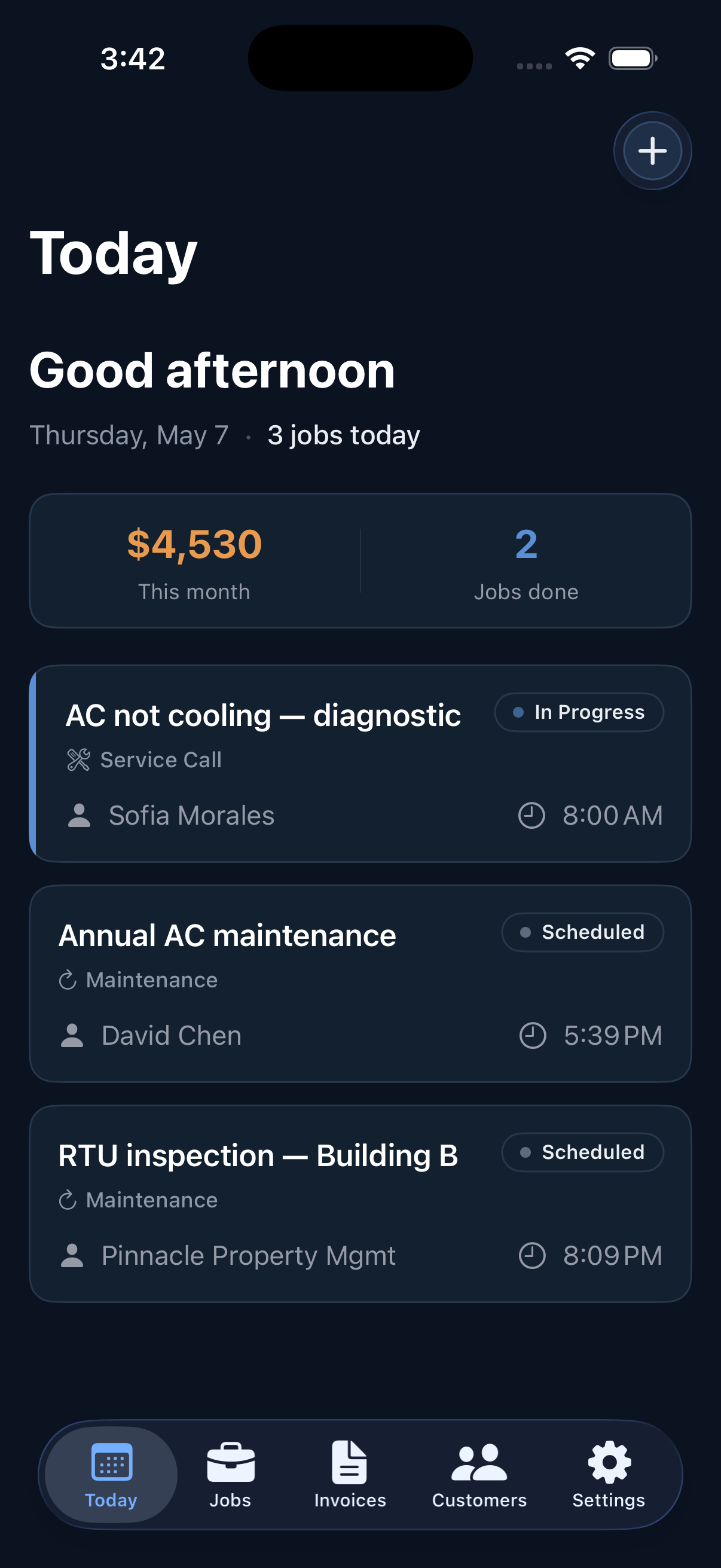
Logged app — Today view
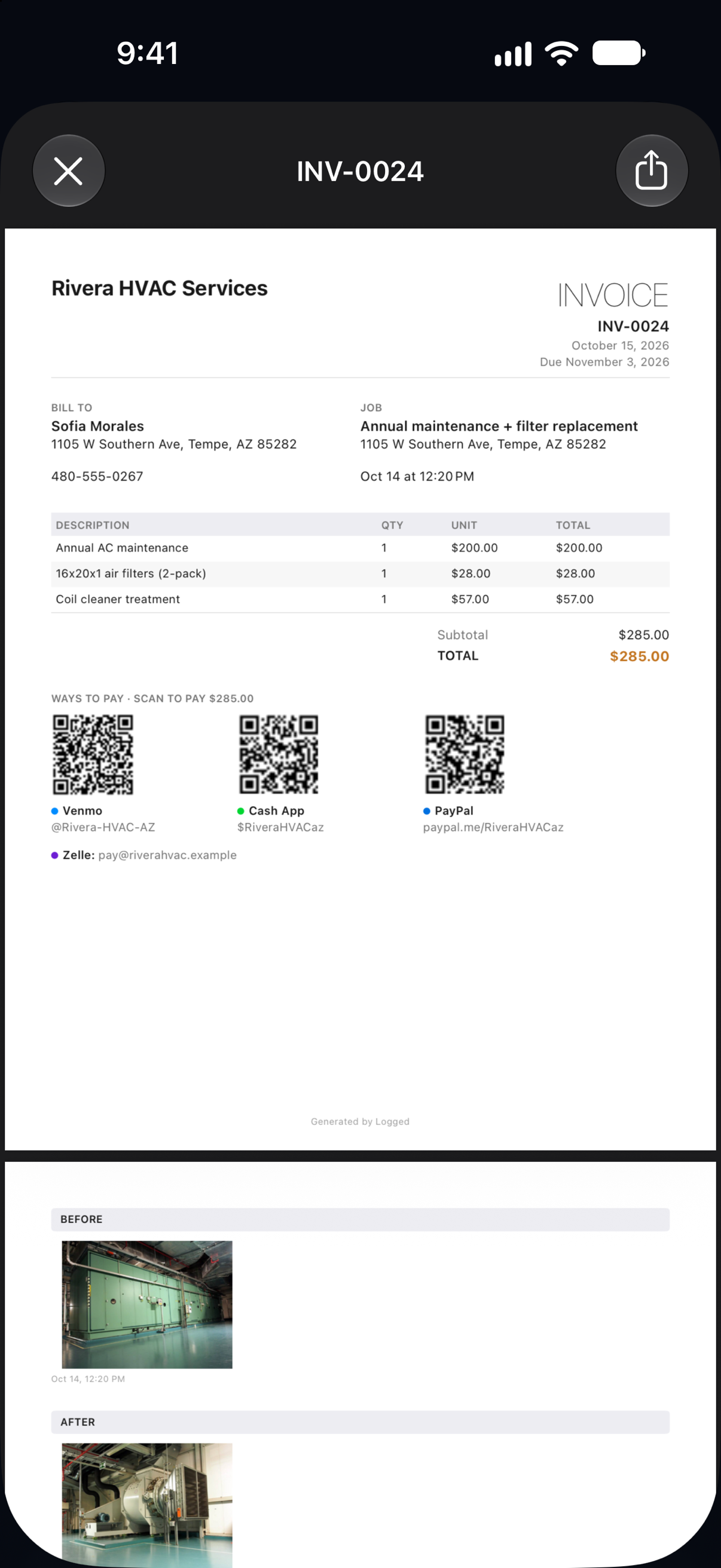
Logged app — invoice PDF with Venmo, Cash App and PayPal QR codes
Invoicing

Invoice sent before you back out of the driveway

One tap generates a PDF with your logo, line items, and job photos. Share it yourself on any plan, or with Pro the client gets an email with a link to a polished invoice page on the web — line items, photos, payment instructions, and a Download PDF button, all rendered for any device. When they view it, you get a push notification.

  • ✓ PDF generated on-device — no internet required
  • ✓ Hosted invoice page at getlogged.app — no PDF wrestling on mobile for your clients
  • ✓ Client signature captured right on the invoice
  • ✓ Push notification when your client views your invoice, and see when they opened it and tapped Pay on invoices you send through Logged (Pro)
  • ✓ Optional Stripe payment link — clients pay by card from the invoice page (Pro)
  • ✓ Automatically emails your client one reminder if an invoice you sent through Logged is unpaid after 7 days (Pro; toggle in Settings)
  • ✓ Partial payments: the invoice shows the balance due, and Pay Now charges just the balance
  • ✓ Overdue detection
Offline send

Tap Send with zero bars — it goes out when you reconnect

Basements, rural lots, new builds with no router — the places you actually work are where signal dies. Other apps make you remember to come back later and hit Send. Logged doesn't. Tap Send offline and it's queued right then — once your phone is back online it sends automatically: right away with Logged open, and in the background when your phone allows it. You get a notification when it lands.

  • ✓ Tap Send offline — no error, no "try again later"
  • ✓ Sends itself automatically when signal returns
  • ✓ Honest status: it shows "Queued," not "Sent," until your client actually has it
  • ✓ Built not to double-send: one tap, one email
9:41✈ Airplane mode● Back online
Invoice
INV-0042 · $485
Jane Doe jane@email.com
◷ Queued to Send ↑ Sending… ✓ Sent
You tapped Send in airplane mode. Logged queued it and sent it automatically once signal came back.
Accept Payments

Get paid faster — Venmo, Cash App, PayPal, Zelle or card

Add your Venmo, Cash App, PayPal and Zelle details once, and every unpaid invoice shows a QR code and tap-to-pay link for each one, with the amount due filled in (Zelle as text) — free on every plan, and the money goes straight to you. On Pro, connect Stripe and clients can also pay by card from the invoice, which is marked paid automatically.

  • ✓ Venmo, Cash App and PayPal QR codes and pay links on every invoice PDF and invoice page, with the balance filled in (free)
  • ✓ Zelle details shown right on the invoice (free)
  • ✓ Stripe Connect Express — onboard in 3 minutes from inside Logged
  • ✓ Funds go directly to your bank — Logged never holds your money
  • ✓ Card payments mark the invoice paid automatically; Venmo, Cash App, PayPal and Zelle payments you mark paid yourself
  • ✓ Push notification the moment a card payment lands
  • ✓ Card processing handled by Stripe at standard rates
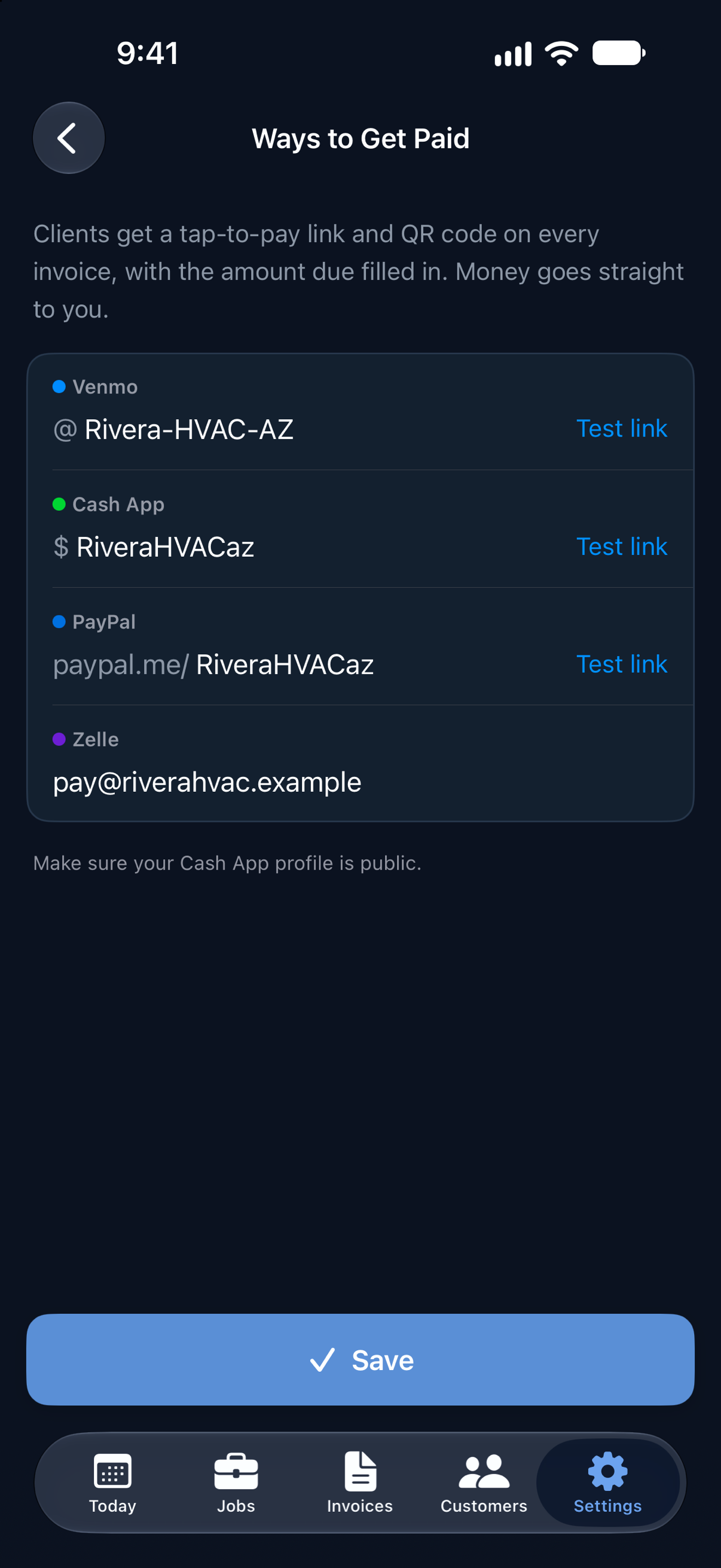
Logged app — Ways to Get Paid: Venmo, Cash App, PayPal and Zelle
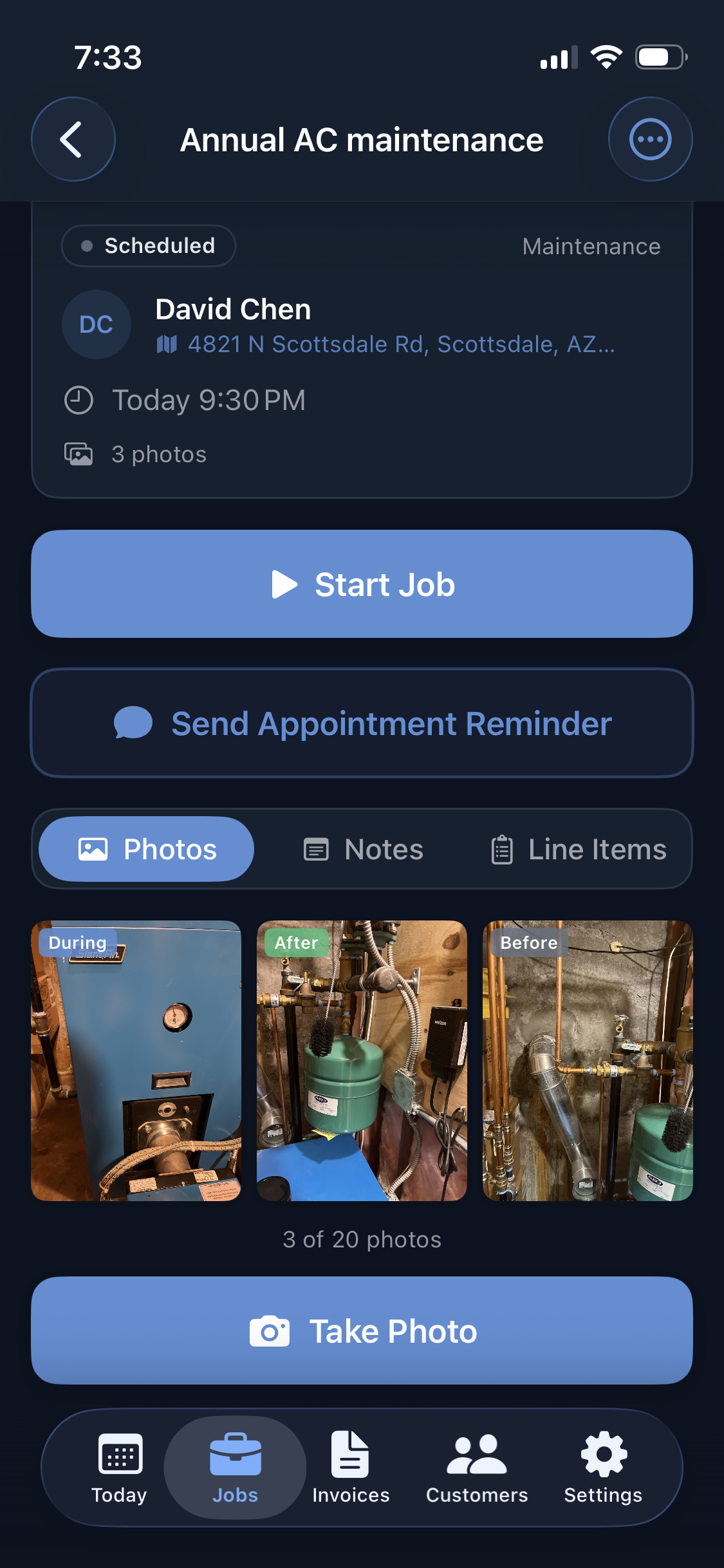
Logged app — Job detail with photos
Photo Documentation

Before/after proof — built into every job and estimate

Capture photos without leaving the app. Tag each one Before or After. Every photo embeds in your invoice or estimate PDF automatically — no separate camera roll hunting, no extra steps.

  • ✓ In-app camera — never leave the job flow
  • ✓ Before/after tagging with a single tap
  • ✓ Photos in invoice and estimate PDFs — free on every plan
  • ✓ Site-visit photos on estimates carry over when you convert to a job
  • ✓ Cloud backup for Pro (up to 20 photos per job)
Customer Management

Every customer, every job, every dollar — one place

Keep contact info, full job history, and lifetime revenue per customer. See what you've earned at a glance and pick up exactly where you left off.

  • ✓ Full job history and lifetime revenue per customer
  • ✓ Address autocomplete when adding customers
  • ✓ One tap to call, email, or get directions
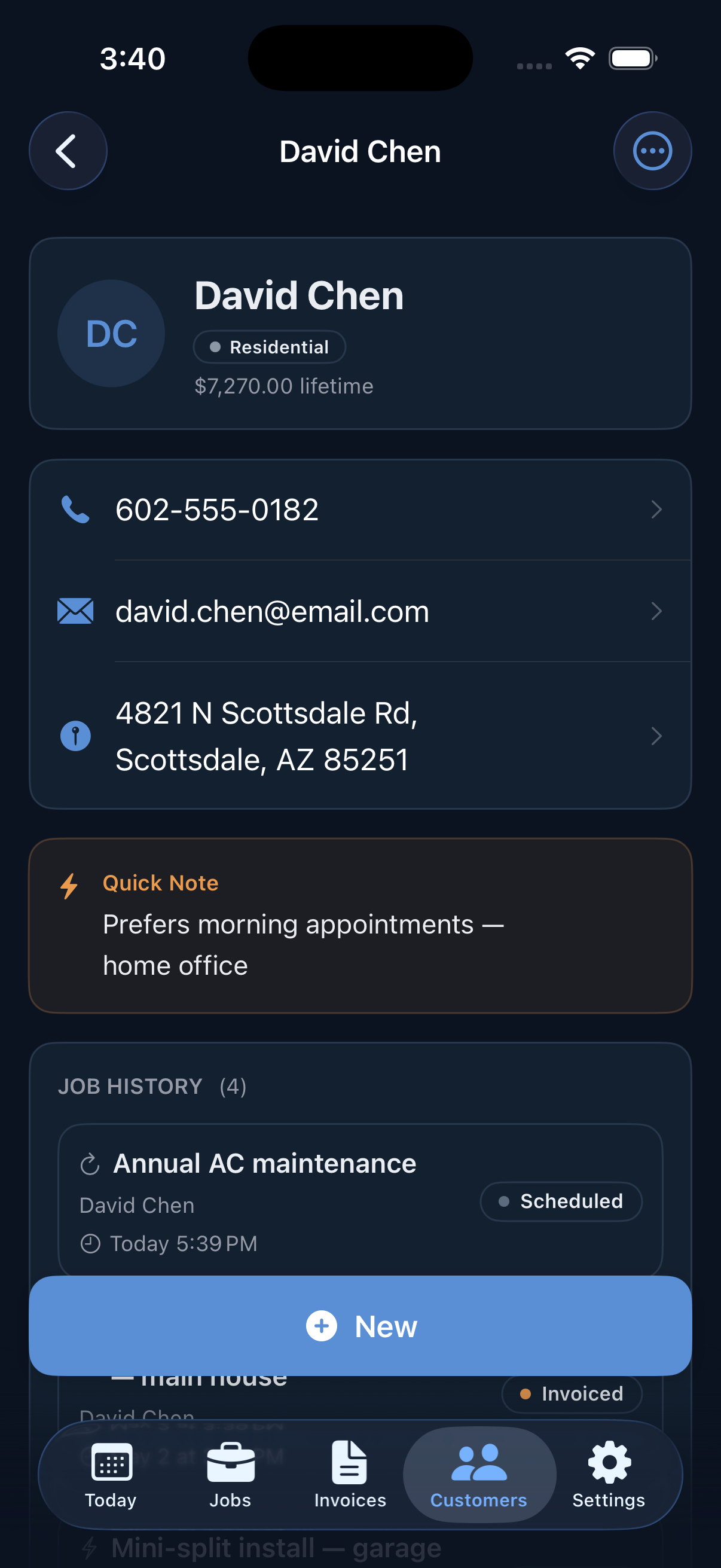
Logged app — Customer detail
Revenue Reports

Know your numbers at a glance

See how much you've earned this month, what's outstanding, and how revenue has trended over the last six months — right from your phone. No spreadsheets, no exports.

  • ✓ Total collected, this month, and outstanding balance
  • ✓ 6-month revenue bar chart
  • ✓ Top customers ranked by lifetime paid revenue
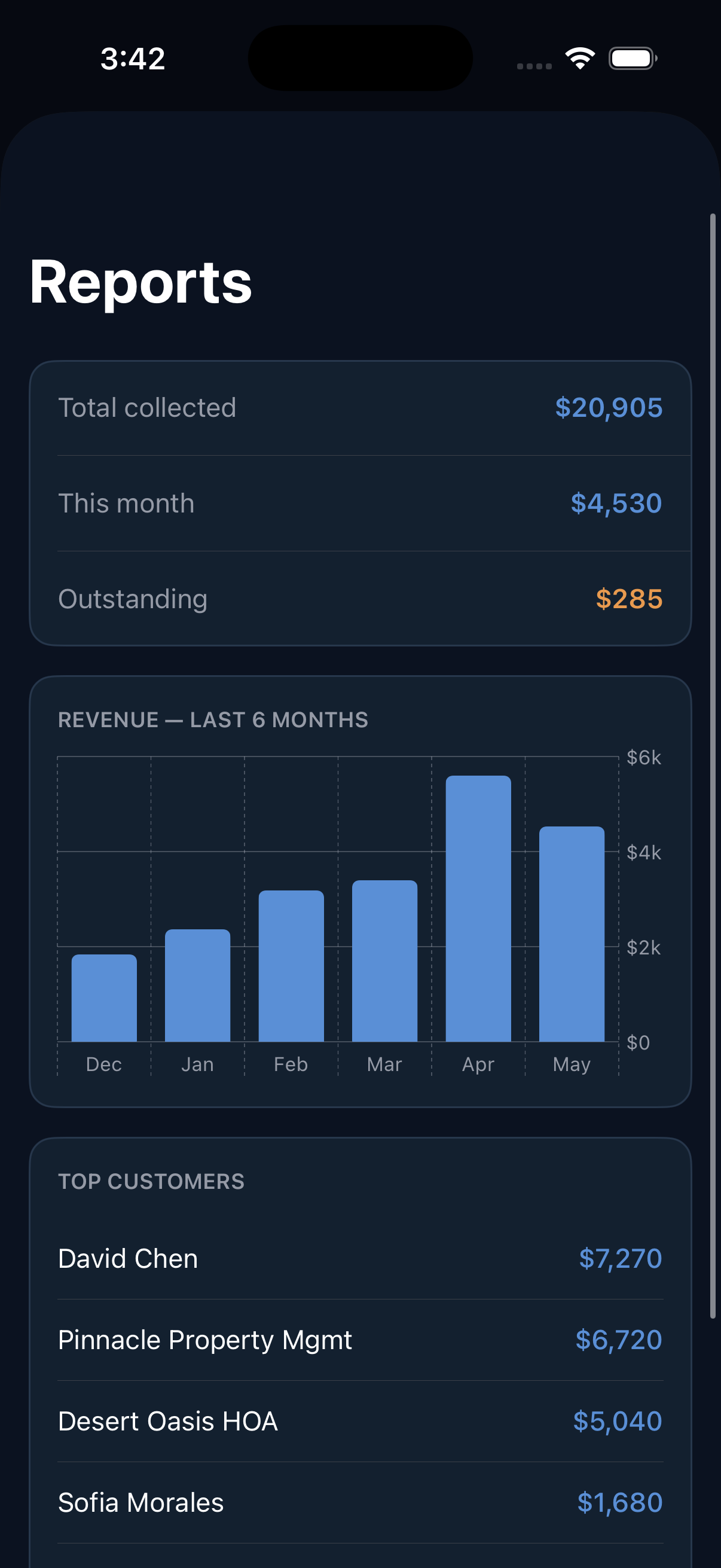
Logged app — Revenue reports
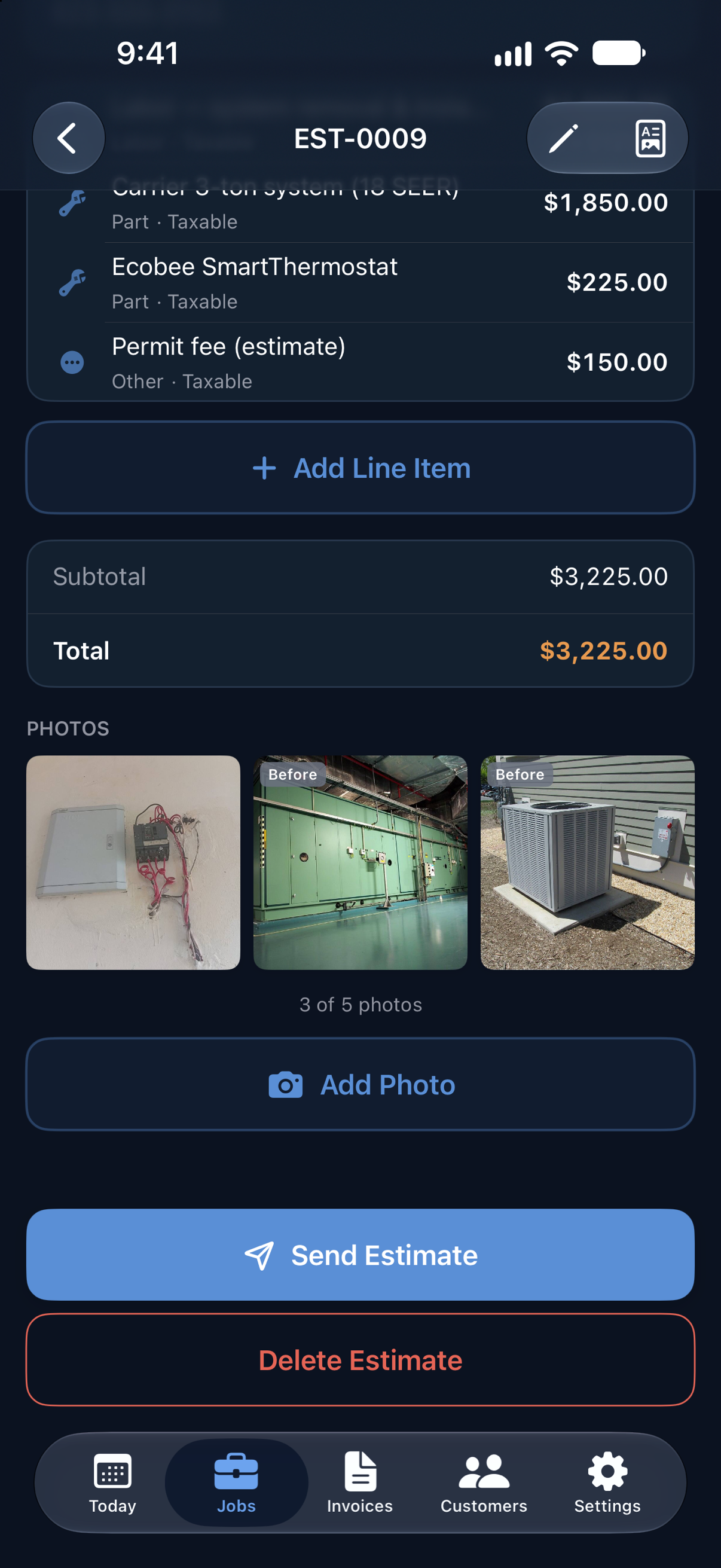
Logged app — estimate with site-visit photos
Estimates & Quotes

Win the job before you start

Build a professional estimate on your phone. Send it with Pro and your client gets a link to a clean web page — they review line items and tap Accept or Decline. No PDF to download, no app to install. You get a push notification the moment they respond.

  • ✓ Clients accept or decline from a web link — no app needed (Pro)
  • ✓ Push notification when your estimate is viewed or accepted (Pro)
  • ✓ Site-visit photos on every estimate and its PDF — free on every plan
  • ✓ One-tap conversion to job and invoice — line items and photos carry over
  • ✓ Send a receipt after payment in one tap (Pro)
Notifications

Know the moment anything happens

The big moments land on your lockscreen the instant they happen — no manual follow-up, no checking in, no wondering if they saw it.

  • ✓ Estimate accepted or declined — the moment they tap
  • ✓ Invoice opened — know before you even follow up
  • ✓ Card payment received — straight from Stripe, automatic
  • ✓ Toggle each type independently in Settings
7:41
Friday, May 23
L
Logged · now
✓ EST-0003 accepted
John Smith accepted your estimate.
L
Logged · 12m ago
Viewed ✓ — INV-0017
Sarah Johnson just opened your invoice.
L
Logged · 1h ago
Paid ✓ — INV-0015
Your client paid INV-0015 — $850.00.
Pricing

Start free. Go Pro when you're ready.

No credit card required. Cancel anytime from your iPhone or Android settings.

Free
$0
Always free — no card required
  • ✓ Up to 10 jobs
  • ✓ 5 customers
  • ✓ 5 photos per job (stored locally)
  • ✓ PDF invoice generation
  • ✓ Photos embedded in PDF
  • ✓ Client signature capture
  • ✓ Manual payment tracking
  • ✓ Venmo, Cash App & PayPal QR codes on your invoices, plus your Zelle details
  • ✓ Up to 3 estimates: share the PDF, mark it accepted, convert to a job (emailing from the app is Pro)
  • ✓ Share invoice, estimate and receipt PDFs yourself, then Mark as Sent so due dates and Overdue track (emailing from the app is Pro)
Most Popular
Pro
$9.99 / mo
Billed monthly · Cancel anytime
$7.50 / mo
$89.99 billed annually · Save $30 per year
  • ✓ Everything in Free
Unlocked with Pro
  • ✓ Unlimited jobs & customers
  • ✓ Unlimited estimates — clients accept from a link
  • ✓ Invoice & estimate email delivery
  • ✓ Push notifications — estimate viewed, accepted, invoice viewed, card payment received
  • ✓ Send receipts after payment
  • ✓ Up to 20 photos per job, cloud backed
  • ✓ Stripe Connect — accept card payments
  • ✓ Auto reminder email to client if an invoice Logged emailed goes unpaid after 7 days
  • ✓ Revenue reports & top customers
  • ✓ Cloud backup & restore on new device
Download on the App Store Get it on Google Play

Start free — upgrade to Pro anytime from within the app

FAQ

Questions, answered honestly

Including how Logged stacks up against Tofu, FieldVibe, Jobber, Housecall Pro, and Joist.

Is Logged free?
Yes. Logged has a free plan that includes up to 10 jobs, 5 customers and 3 estimates, PDF invoices you share yourself and mark as sent, photo documentation, and client signature capture — no credit card required. You can upgrade to Pro at any time for unlimited jobs, customers, and additional features.
How much does Logged Pro cost?
Logged Pro costs $9.99 per month, or $89.99 per year ($7.50/mo, saving 25%). The free plan is available forever with no credit card required.
What trades is Logged built for?
Logged is built for solo trades contractors including plumbers, electricians, HVAC technicians, painters, roofers, handymen, and general contractors. It is designed for solo operators, not crews or large teams.
Does Logged work without an internet connection?
Yes. Logged is fully offline-first — you can log jobs, take photos, generate invoices, and even tap Send with no internet connection. A send made offline is queued instantly and goes out automatically once you're back online; your data syncs to the cloud in the background.
Can I send an invoice or estimate with no signal?
Yes. Tap Send with zero bars and Logged queues it right then — no error, no "try again later." The moment your phone catches signal, the email sends automatically, and you get a notification when it lands. Logged never marks an invoice "sent" until your client actually has it, and it never double-sends.
Can I accept card payments from clients?
Yes, with Logged Pro. Connect your Stripe account once and every invoice can include a Pay Now link. Clients pay by card directly from their email and the invoice is marked paid automatically. Funds go directly to your bank — Logged never holds your money.
Does Logged work on iPhone Duo?
Yes. Logged is built for iPhone Duo. Unfolded, the list (jobs, estimates, invoices, customers) sits beside the job or invoice you have open, and detail screens use two columns when they have the whole display. Folding or unfolding keeps your place and anything you were typing.
Is Logged available on Android?
Yes. Logged is available on both iPhone (App Store) and Android (Google Play). Both apps are built natively — Swift for iOS, Kotlin for Android — and share the same cloud backend, so you can sign in on either device with email or Google (Sign in with Apple is iPhone-only for now).
Is Logged a Jobber alternative?
Yes — Logged is built for the solo contractors Jobber also targets, at a fraction of the price ($9.99/mo vs $39+/mo). The key difference: Logged is focused on field-first simplicity — log a job, snap photos, send an invoice or estimate in under 90 seconds. Jobber adds scheduling, dispatching, and CRM features that solo contractors pay for and rarely use. If you run a one-person or two-person trades business and want fast invoicing without the overhead, Logged is worth trying free.
Is Logged a Housecall Pro alternative?
Yes. Housecall Pro is a full field service management platform — scheduling, dispatch, GPS tracking, customer portal — priced accordingly ($49+/mo). Logged does not have scheduling or dispatching; it's purpose-built for solo contractors who need job logging, photo documentation, estimates with client accept/decline, and fast invoicing. If you need a one-truck-shop invoicing app that works offline and gets out of your way, Logged is the simpler, cheaper option.
How is Logged different from Joist?
Both apps target solo trades contractors. Logged differentiates on three things: (1) Clients can accept or decline estimates from a web link — no printing, no PDF hunting, no app needed on their end. (2) With Pro, every invoice and estimate you send through Logged has a push notification — you know the moment your client opens your estimate or pays. (3) Both the iOS and Android apps are written natively (Swift and Kotlin) for the best possible camera, offline, and notification experience. Joist is a solid app; Logged is a newer, more notification-forward option worth comparing.
How is Logged different from FieldVibe?
FieldVibe is scheduling-first — its standout feature is automated SMS reminders to clients before appointments. Logged is invoicing-first — job documentation, GPS-tagged photos, estimates with client accept/decline, and Stripe card payments. FieldVibe also requires a connection to create new jobs; Logged is fully offline-first. FieldVibe Solo Pro is $20/mo vs Logged at $9.99/mo. If appointment no-shows are your pain point, FieldVibe is built for that. If evening paperwork and getting paid faster are your pain point, Logged is.
Is Logged a Tofu alternative?
Yes. Both target solo contractors who need quotes, invoices, and card payments on their phone. Key differences: Logged has a permanent free tier — Tofu offers a 7-day trial with no ongoing free plan. Logged takes no platform fee on card payments; Tofu charges 1% on top of Stripe's processing fee. Logged is written natively in Swift (iOS) and Kotlin (Android). Logged also includes push notifications the moment a client views or pays an invoice, and estimates clients can accept or decline from a web link — no app needed on their end.
Does Logged work without Wi-Fi or cell signal?
Fully. Logged is offline-first — all data is stored on your device first. You can log jobs, take photos, generate invoices, and tap Send with no internet connection. A send queued offline goes out automatically once you're back on signal, and everything syncs in the background. This matters for contractors working in basements, rural properties, or anywhere signal is spotty.
Do clients need to download an app to accept my estimate or pay my invoice?
No. When you send an estimate or invoice through Logged (Pro), your client gets an email with a link to a clean web page. They review the line items and tap Accept or Decline right in their browser — no app, no account, no download required. For invoices with card payment enabled, they pay directly from the same web page.
Does Logged have scheduling or dispatching?
Not in v1. Logged is intentionally focused on the job-documentation and invoicing workflow — log the job, capture photos, send an estimate, invoice when done. Scheduling, dispatch, and route optimization are features built for multi-crew operations. If you need full field service management, Jobber or Housecall Pro are better fits. If you need fast, offline-first invoicing that works on your phone with one hand, Logged is built for that.
Compare Logged to
Built for your trade

Built for the field,
not the office.

Job logged. Invoice sent. Get paid.

Download on the App Store Get it on Google Play

Last verified: 2026-07-31.

Maintained by Warner Creates LLC. Pricing and feature details verified against the live Logged app and its App Store and Google Play listings.